Control YourDisplays
The menu bar app that gives you complete control over brightness and color temperature across all your monitors.
Requires macOS 14 (Sonoma) or later
Brightness Control, Simplified
Montr lives in your menu bar, ready when you need it, invisible when you don't.
Detect All Displays
Montr automatically detects all connected monitors - built-in, external, HDMI, USB-C, DisplayPort. No configuration needed.
Adjust with Precision
Control brightness, contrast, and color temperature for each display independently. Real hardware control via DDC/CI.
Save & Switch Profiles
Create profiles for different scenarios. Auto-activate based on connected displays, time of day, or power source.
Everything You Need
Built for professionals who demand precision and power users who want simplicity.
Per-Display Brightness
Control each monitor independently. Set different brightness levels for your laptop, external monitor, or ultrawide.
Night Shift Control
Adjust color temperature from 2700K to 6500K. Schedule automatic warm tones at sunset or set custom schedules.
Quick Dim
Instantly dim all displays to your preferred level with one click. Perfect for presentations or movie time.
Display Profiles
Save complete display configurations. Switch between Work, Movie, Night, or custom profiles in a click.
Auto-Activation
Profiles activate automatically based on connected monitors, time of day, or battery vs. power adapter.
DDC/CI Hardware Control
Real brightness adjustment at the hardware level. No gamma tricks - actual display brightness control.
Contrast Control
Fine-tune contrast for supported displays. Get the perfect picture for any content or environment.
Sunrise/Sunset Schedule
Uses your location to calculate sunrise and sunset. Night Shift activates and deactivates automatically.
Keyboard Shortcuts
Global hotkeys for common actions. Adjust brightness, toggle Night Shift, or switch profiles without looking.
See It In Action
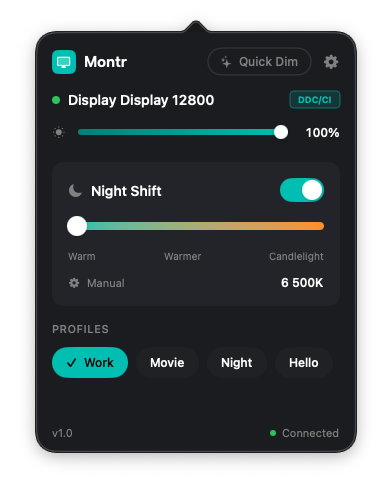
Clean, intuitive interface that stays out of your way until you need it.
Main Interface
Quick access to all display controls from your menu bar
Privacy First
Montr is a simple display control app. It doesn't need your data, and it doesn't take it.
No Account Required
Download, open, use. No sign-up, no login, no email collection.
No Telemetry
Zero analytics or usage tracking. Your display settings stay on your Mac.
Location Optional
Only used for sunrise/sunset calculation. Never leaves your device.
Local-Only Storage
All your display profiles, preferences, and settings are stored locally in macOS UserDefaults. Nothing syncs to the cloud. Nothing leaves your machine.
Works With Your Setup
Whether you have one display or five, Montr handles them all.
Built-in Displays
MacBook, MacBook Pro, MacBook Air, iMac - native brightness control for all Apple displays.
External Monitors
Dell, LG, Samsung, ASUS, BenQ, and most DDC/CI compatible monitors via HDMI, DisplayPort, or USB-C.
All Connections
HDMI, DisplayPort, Thunderbolt, USB-C - Montr works with any connection type your Mac supports.
Note: DDC/CI hardware brightness control works with most external monitors. For displays that don't support DDC/CI, Montr provides a software brightness fallback (clearly labeled in the UI).
Get Montr
Download Montr for free and take control of your displays. No account, no payment, no catch.
Download for macOSRequires macOS 14 (Sonoma) or later
Universal binary (Apple Silicon + Intel)
Love Montr? Consider supporting development.
☕ Buy me a coffee